Adding your team
A team belongs to an agency. Create one from Team and you can add colleagues to it; your plan decides how many seats it has, and the page shows how many are in use.
Adding a colleague
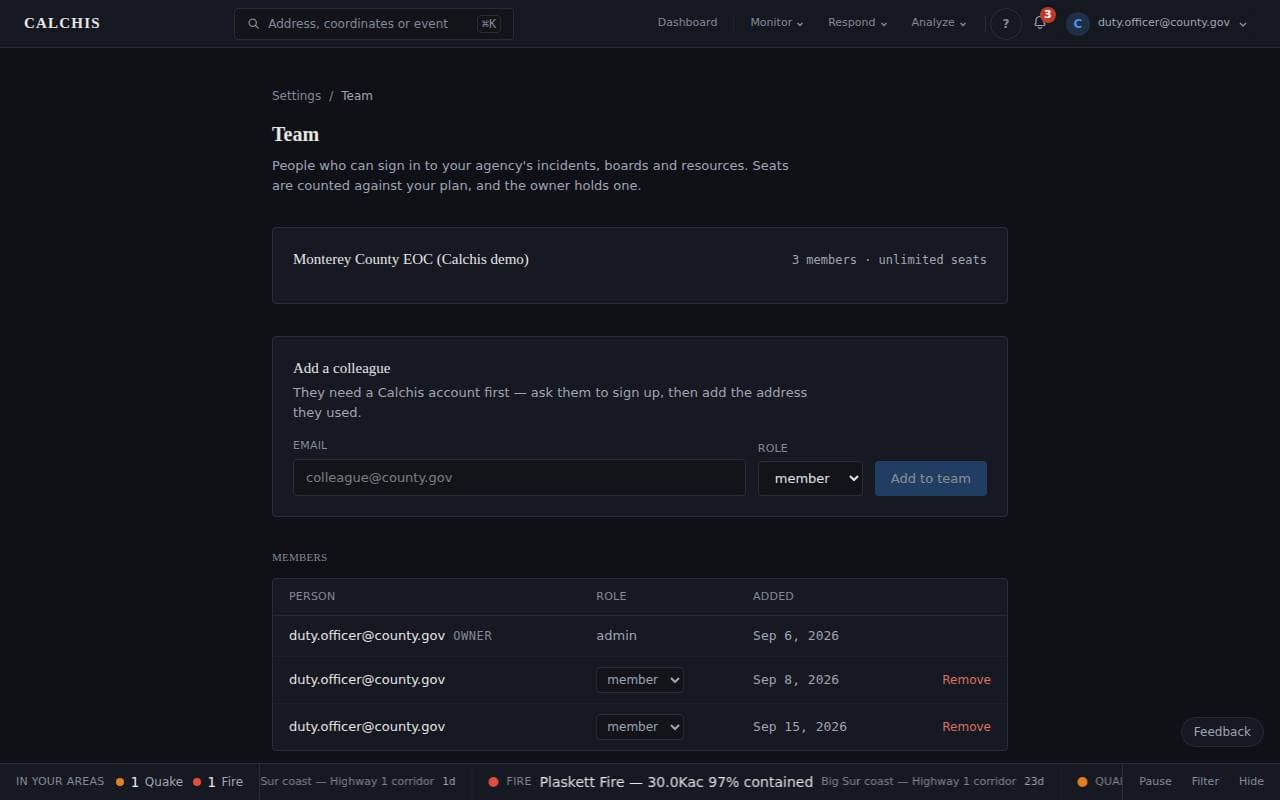
They need a Calchis account first: ask them to sign up, then add the address they used and choose a role.
- admin and manager can change what the agency shares — its conditions among them.
- member works incidents and sees everything the agency sees.
- viewer sees, and changes nothing.
What the agency shares
Conditions are the agency's, not each person's: a list that differed per person would not be a commander's list. Incidents in the agency are worked by everyone in it, and the wall display signed in as any member shows the same picture.
Step by step
Step 1: Your agency and its members
The page shows the agency, the seats in use and every member with their role. The owner adds colleagues from Add a colleague.
Last updated September 18, 2026
Related Guides
Decision-support intelligence — not a primary alerting or dispatch system. Verify against official sources.Guides describe how the platform works; they are not a substitute for professional actuarial assessment or for the official guidance of the agencies responsible for an incident.